Les containers
Découverte de la containerisation via Docker


On continue notre chemin
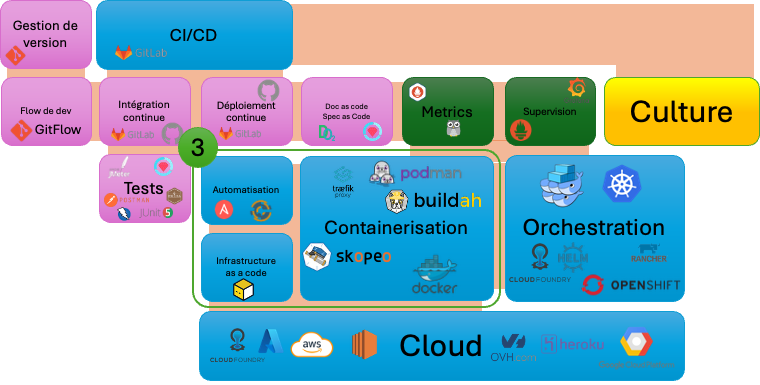
Vidéo précédante
Le Cloud : Concept, histoire, acteurs
Premier centric pour intégrer le DevOps
 Romain GEORGES
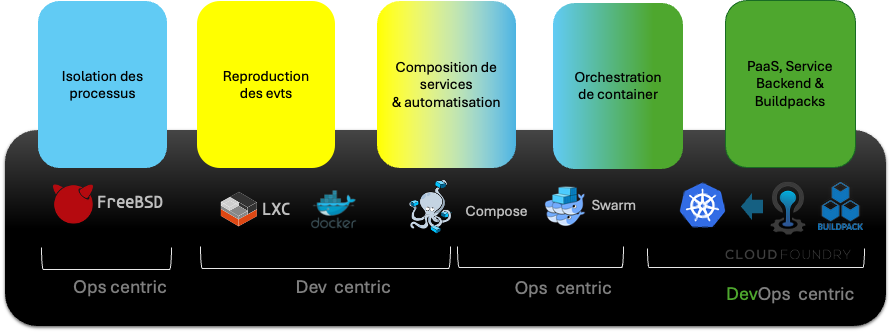
Origines de la containerisation
D’un besoin Ops pour une concrétisation Ops puis DevOps, proposé par et pour les Devs
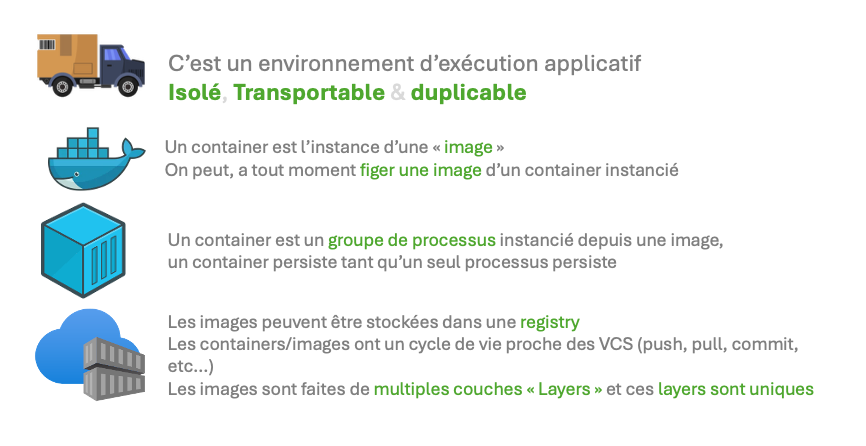
Un container, Qu’est-ce que c’est ?
Un container, n’est pas une VM
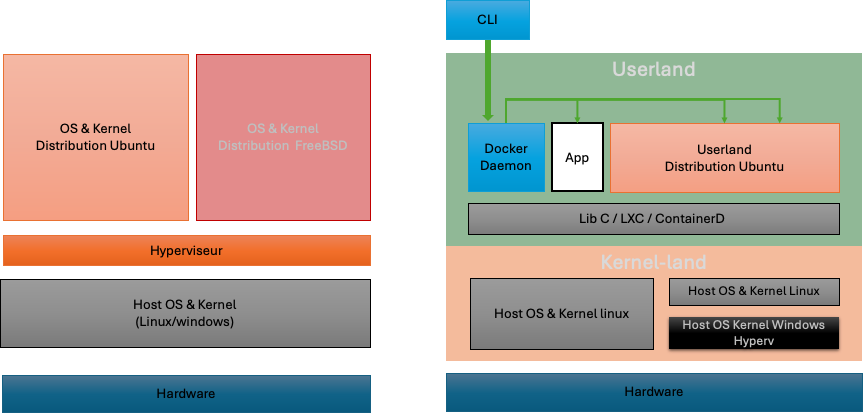
Construire un container
La B-A BA
0:00
/0:11
Mettre dans la boite ce qui est nécessaire
0:00
/0:25
Doit être dans la boite TOUT ce qui est nécessaire
0:00
/0:28
Containerisation, isolation
les namespaces la paire de lunettes du noyau
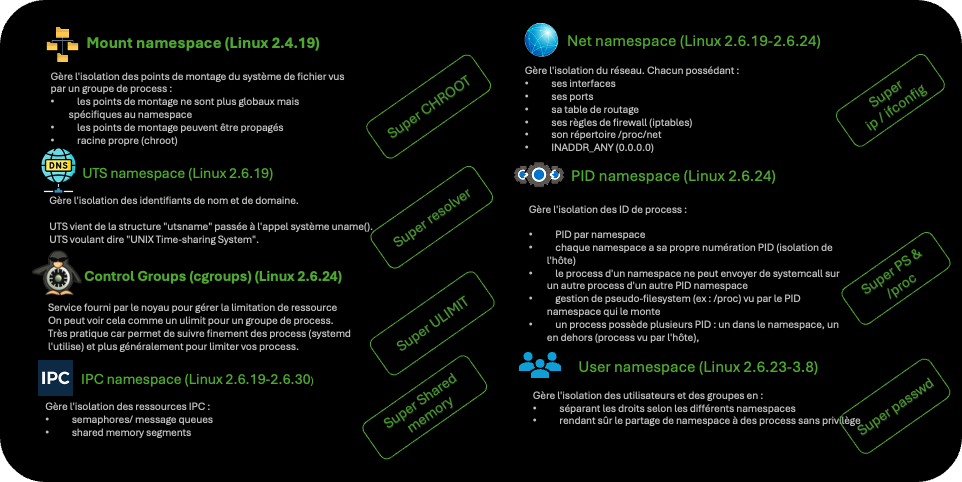
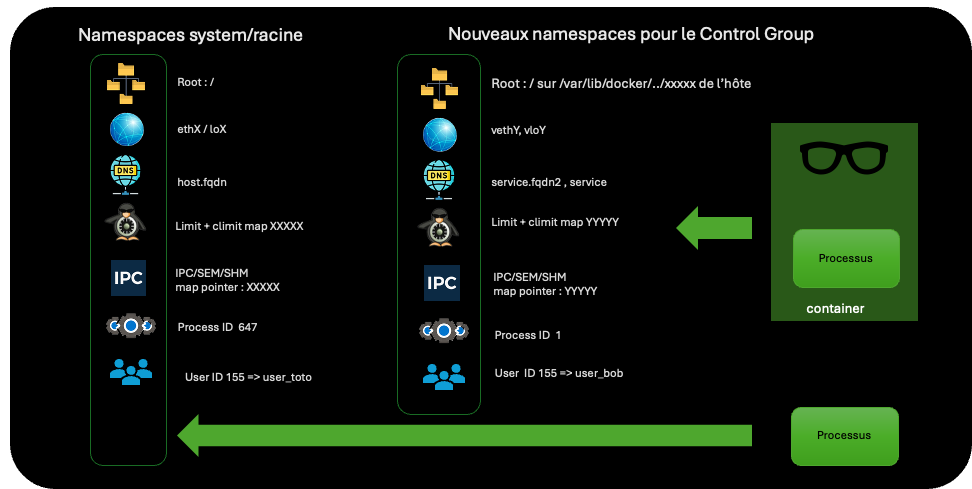
Isolation, existe sans Docker
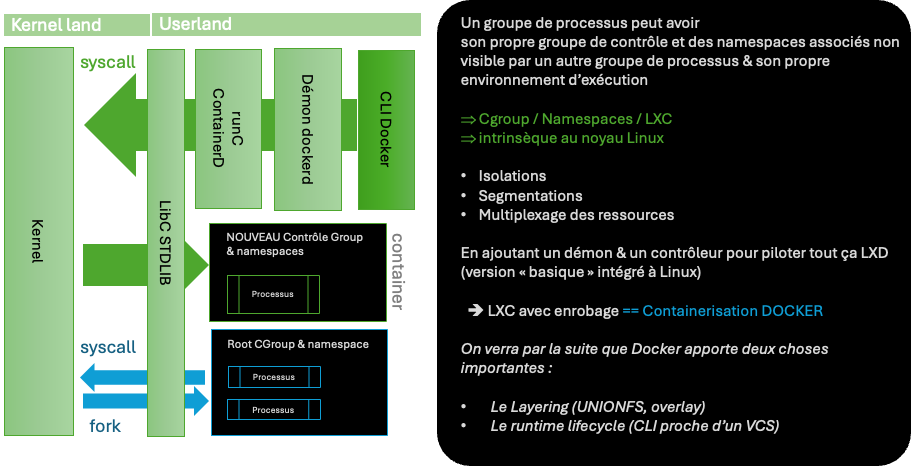
le container en détail
0:00
/0:23
IRL : Partir d’une image « raffinée » , d’un logiciel déjà déployé
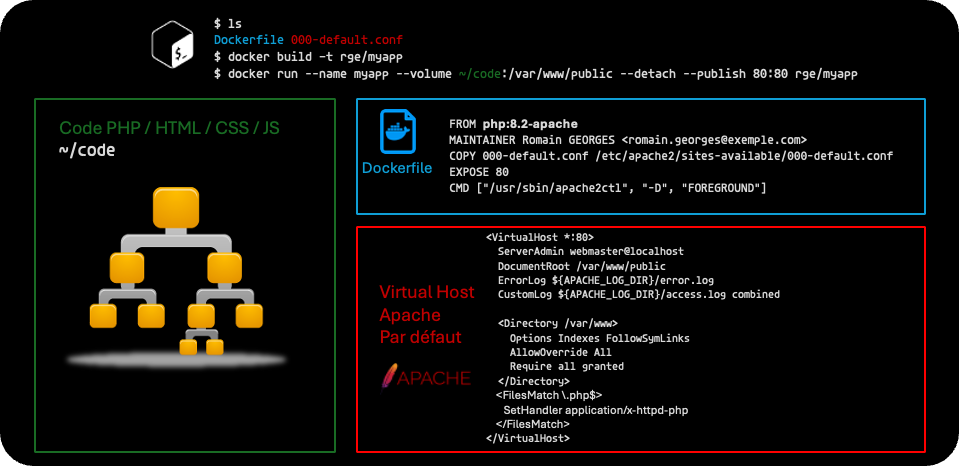
Containerisation : Transportable
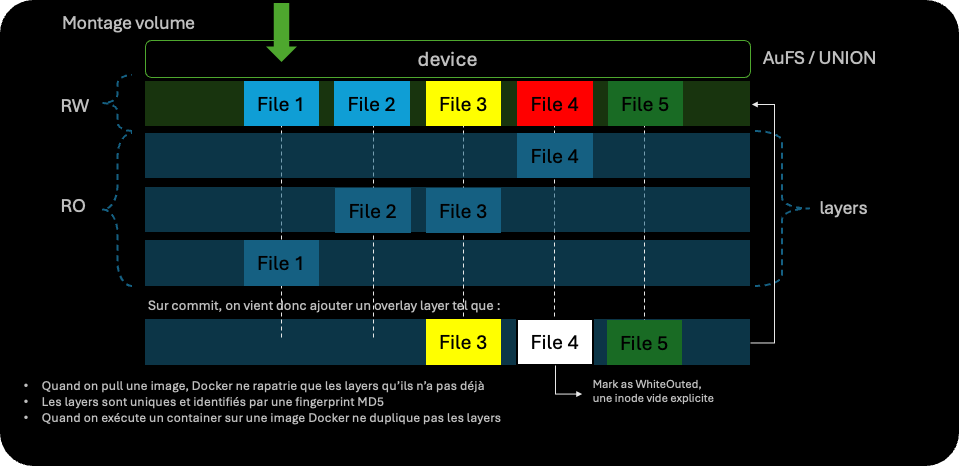
les layers (couche en français)
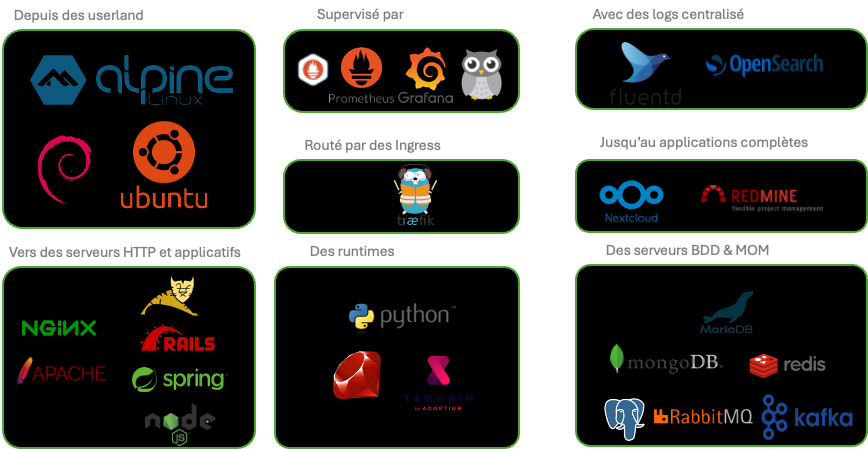
Des images pour tout
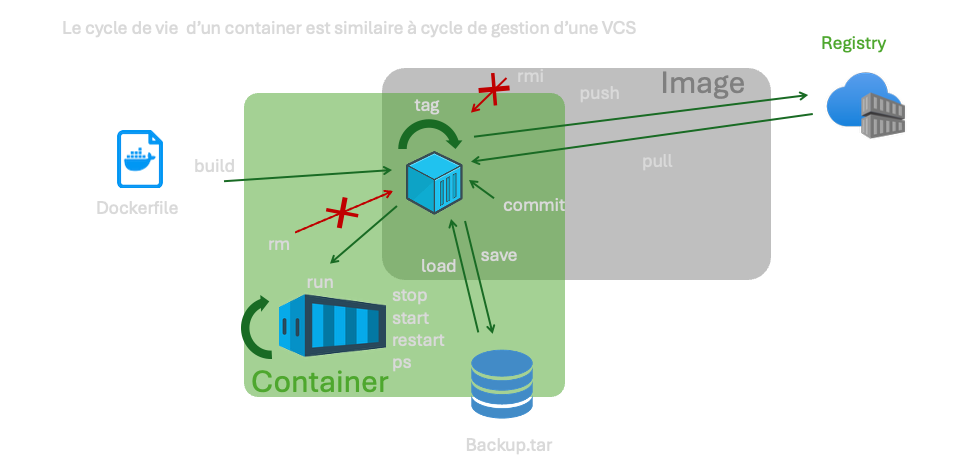
Comme un VCS, des images au container et réciproquement
Eclairage sur docker
Récupère et lance un serveur Nginx, le binder sur le port 80
$  docker pull nginx:latest
[…]
$ echo ‘hello word’ > test.txt

$ docker run --rm -d -p 80:80 -v ./test.txt/:/var/html/www" nginx:latest
d9951080544d555d8bea0cbbb8e40d349577fd6924f523088765781349a67684

$ docker ps
CONTAINER ID   IMAGE          COMMAND                  CREATED          STATUS          PORTS                               NAMES
d9951080544d   nginx:latest   "/docker-entrypoint.…"   25 seconds ago   Up 24 seconds   0.0.0.0:80->80/tcp, :::80->80/tcp   charming_liskov

$ curl localhost/test.txt
‘hello word’
$ docker stop d99
D99

$ docker ps –a
CONTAINER ID   IMAGE     COMMAND   CREATED   STATUS    PORTS     NAMES
$ rm test.txt
Comparaison entre un processus dans le container et depuis l’host
$ docker run --name monubuntu -it ubuntu:latest bash
root@36411ea36440:/# apt update
[…]
root@36411ea36440:/# apt install htop
[…]
root@36411ea36440:/# htop
Htop se lance et reste actif, allez sur un autre shell
$ ps aux|grep htop
5162 root      0:00 htop

$ docker exec monubuntu ps aux|grep htop
root       186  0.0  0.0   5448  3968 pts/0    S+   18:12   0:00 htop

$ cat /proc/5162/cgroup
0::/docker/36411ea3644071e691408cd2e693f0e8ac75b4f0d9a4d4dd648a5de06f09e589

$ docker ex
Quitter Htop et fermer le shell, le container se stop
$ docker ps -a
CONTAINER ID   IMAGE           COMMAND   CREATED          STATUS                     PORTS     NAMES
36411ea36440   ubuntu:latest   "bash"    19 minutes ago   Exited (0) 5 seconds ago             monubuntu

$ docker rm monubuntu
monubuntu
Re-lance un serveur Nginx, en le bindant sur le port 80
$ docker run --rm -d -p 80:80 nginx:latest
43ed168fddd019c3f7622bf05b67f18a93a63337fd00239d048bc9c5e4d271b8

$ docker ps
CONTAINER ID   IMAGE          COMMAND                  CREATED          STATUS          PORTS                               NAMES
43ed168fddd0   nginx:latest   "/docker-entrypoint.…"   12 seconds ago   Up 11 seconds   0.0.0.0:80->80/tcp, :::80->80/tcp   tender_wozniak

$ ps aux|grep docker-proxy
 5277 root      0:00 /usr/bin/docker-proxy -proto tcp -host-ip 0.0.0.0 -host-port 80 -container-ip 172.17.0.2 -container-port 80
 5283 root      0:00 /usr/bin/docker-proxy -proto tcp -host-ip :: -host-port 80 -container-ip 172.17.0.2 -container-port 80
On voit des process docker-proxy qui maintiennent le NAT NFTABLES
$ sudo iptables -L -t nat|grep DNAT
DNAT       tcp  --  anywhere             anywhere             tcp dpt:http to:172.17.0.2:80
DNAT       udp  --  anywhere             192.168.5.3          udp dpt:domain to:192.168.5.2:53504
DNAT       tcp  --  anywhere             192.168.5.3          tcp dpt:domain to:192.168.5.2:55614

$ docker stop 43
43

$ sudo iptables -L -t nat|grep DNAT
DNAT       udp  --  anywhere             192.168.5.3          udp dpt:domain to:192.168.5.2:53504
DNAT       tcp  --  anywhere             192.168.5.3          tcp dpt:domain to:192.168.5.2:55614

$ docker image ls
REPOSITORY                                          TAG                    IMAGE ID       CREATED         SIZE
[…]
ubuntu                                              latest                 c3d1a3432580   11 days ago     101MB
[…]

$ docker image rm ubuntu
Untagged: ubuntu:latest
Untagged: ubuntu@sha256:72297848456d5d37d1262630108ab308d3e9ec7ed1c3286a32fe09856619a782
Deleted: sha256:c3d1a34325805c22bf44a5157224bcff58dc6a8868558c7746d6a2ea64eb191c
Deleted: sha256:375990b2a90a8d8f332d9b9422d948f7068a3313bf5a1c9fbb91ff2d29046130
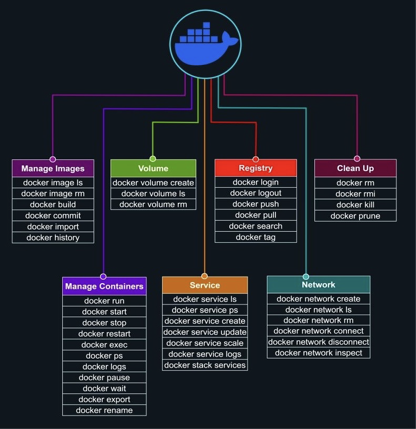
Docker sheet cheats
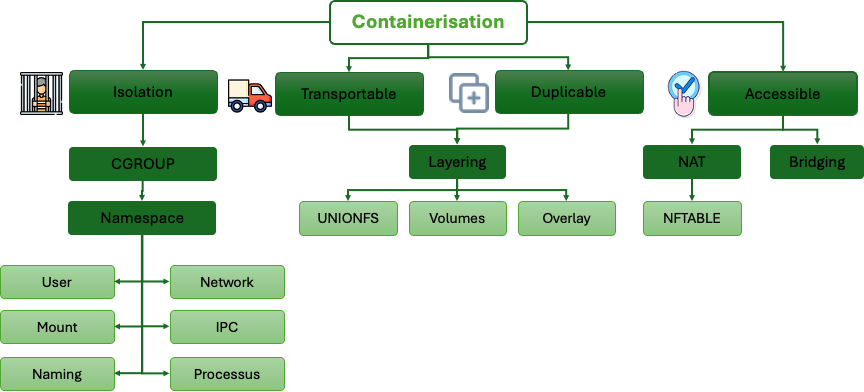
Containerisation : synthèse
vidéo suivante
Containers : Composition
Docker compose
 Romain GEORGES